Add saved views
Use saved views when users need intentional presets they can come back to, share, or promote to defaults.
Current-view persistence remembers the last state automatically. Saved views are named states people manage on purpose.
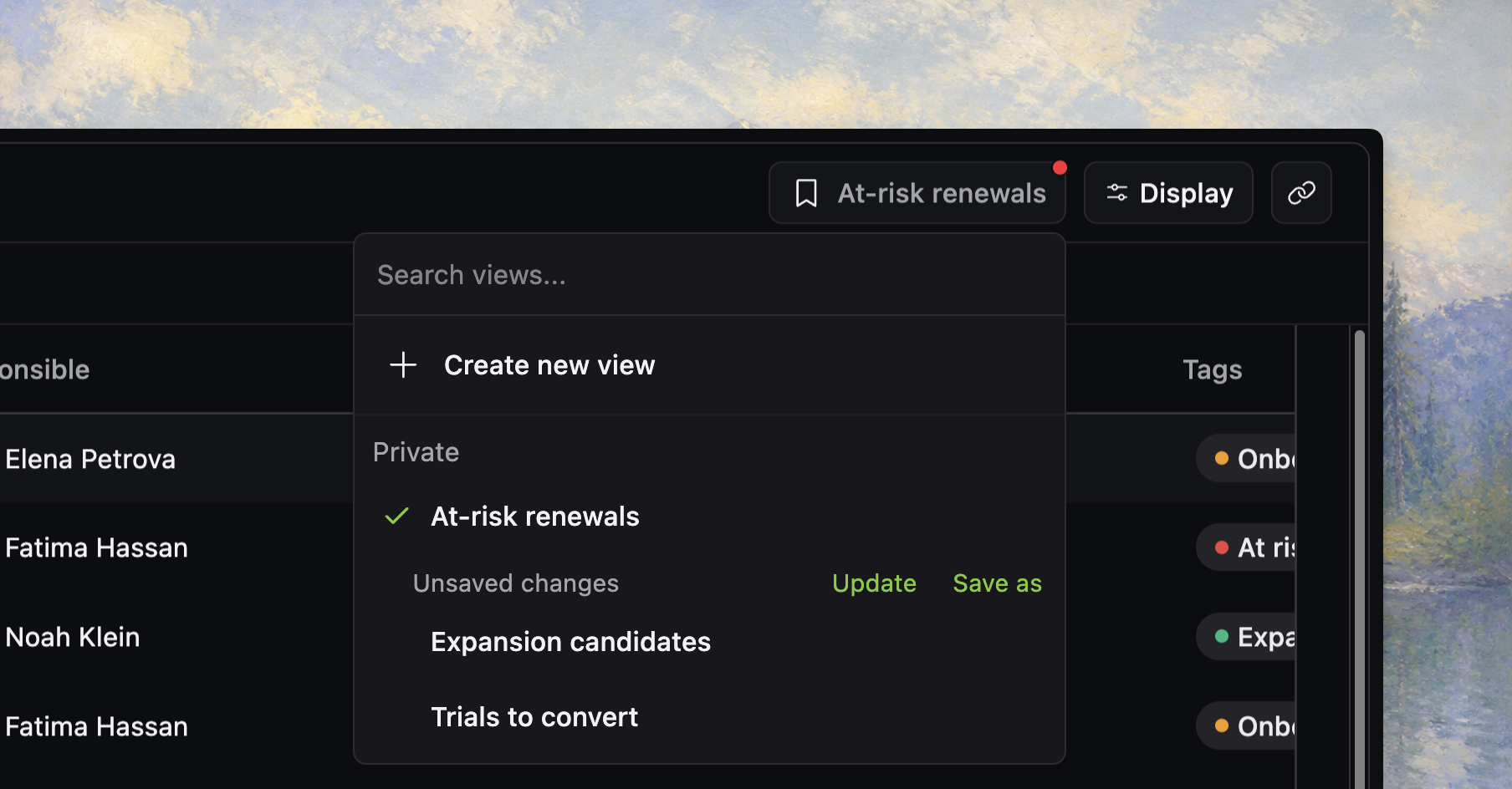
Saved views vs persistence
Add saved views when users need to:
- switch between recurring table setups
- name those setups for later reuse
- give teammates a shared starting point
- set personal or workspace defaults
If the table only needs to remember what one person last did, start with current-view persistence instead.
Configure a view adapter
Saved views are enabled with views.
import { localStorageDatatableViewAdapter } from "./react-datatable/state/saved-views"

<Datatable
  tableKey="customers"
  data={rows}
  columns={columns}
  getRowId={(row) => row.id}
  views={{
    adapter: localStorageDatatableViewAdapter,
    workspaceId: workspace.id,
    userId: currentUser.id,
  }}
/>
The adapter inherits the top-level tableKey. Keep workspaceId and userId aligned with the rest of the table state system.
That keeps persistence, defaults, and saved views pointed at the same product surface.
Expose the views control
Most tables should expose saved views through the toolbar.
<Datatable
  tableKey="customers"
  data={rows}
  columns={columns}
  getRowId={(row) => row.id}
  views={{
    adapter: localStorageDatatableViewAdapter,
    workspaceId: workspace.id,
    userId: currentUser.id,
  }}
  toolbar={{
    quickSearch: true,
    filterButton: true,
    displayOptions: true,
    views: true,
  }}
/>
If the table does not expose a views control, users have no obvious way to create, switch, or manage named presets.
[!NOTE] Screenshot placeholder: saved-views dropdown open in the toolbar with a few realistic named presets, a current active view, and obvious create/manage actions.
What a saved view stores
Saved views store the same durable table state shape used by current-view persistence.
That means a view can capture:
- column visibility, order, and widths
- sticky column count and display settings
- sorting and grouping
- global search and column filters
- filter mode and group expansion
A saved view does not exist to preserve temporary action state like selection or open dialogs.
Choose an adapter
localStorageDatatableViewAdapter is good for browser-local experimentation and private presets.
It supports:
- creating, updating, and deleting private views
- setting a user default view
It does not support:
- sharing a view to the workspace
- setting workspace defaults
Use a backend adapter when views need to follow users across devices or support team-wide shared presets.
Add a backend adapter
A backend adapter implements the DatatableViewAdapter contract.
import type {
  DatatableView,
  DatatableViewAdapter,
} from "../../../kit/src/react-datatable/state/saved-views"

export const datatableViewServerAdapter: DatatableViewAdapter = {
  async list(config) {
    const res = await fetch(`/api/datatable-views?tableKey=${config.tableKey}&workspaceId=${config.workspaceId}&userId=${config.userId}`)
    if (!res.ok) throw new Error("Failed to list views")
    return (await res.json()) as DatatableView[]
  },

  async get(config, viewId) {
    const res = await fetch(`/api/datatable-views/${viewId}?tableKey=${config.tableKey}&workspaceId=${config.workspaceId}&userId=${config.userId}`)
    if (res.status === 404) return null
    if (!res.ok) throw new Error("Failed to load view")
    return (await res.json()) as DatatableView
  },

  async create(config, view) {
    const res = await fetch("/api/datatable-views", {
      method: "POST",
      headers: { "content-type": "application/json" },
      body: JSON.stringify({ config, view }),
    })
    if (!res.ok) throw new Error("Failed to create view")
    return (await res.json()) as DatatableView
  },

  async update(config, viewId, updates) {
    const res = await fetch(`/api/datatable-views/${viewId}`, {
      method: "PATCH",
      headers: { "content-type": "application/json" },
      body: JSON.stringify({ config, updates }),
    })
    if (!res.ok) throw new Error("Failed to update view")
    return (await res.json()) as DatatableView
  },

  async delete(config, viewId) {
    const res = await fetch(`/api/datatable-views/${viewId}`, {
      method: "DELETE",
      headers: { "content-type": "application/json" },
      body: JSON.stringify({ config }),
    })
    if (!res.ok) throw new Error("Failed to delete view")
  },

  async share(config, viewId) {
    const res = await fetch(`/api/datatable-views/${viewId}/share`, {
      method: "POST",
      headers: { "content-type": "application/json" },
      body: JSON.stringify({ config }),
    })
    if (!res.ok) throw new Error("Failed to share view")
    return (await res.json()) as DatatableView
  },

  async setUserDefault(config, viewId) {
    const res = await fetch("/api/datatable-views/defaults/user", {
      method: "PUT",
      headers: { "content-type": "application/json" },
      body: JSON.stringify({ config, viewId }),
    })
    if (!res.ok) throw new Error("Failed to set user default")
  },

  async setWorkspaceDefault(config, viewId) {
    const res = await fetch("/api/datatable-views/defaults/workspace", {
      method: "PUT",
      headers: { "content-type": "application/json" },
      body: JSON.stringify({ config, viewId }),
    })
    if (!res.ok) throw new Error("Failed to set workspace default")
  },
}
This is the kind of adapter you need when views are shared across a team, follow users across devices, or need admin-managed workspace defaults.
Default precedence
Saved views can act as defaults, but only when there is no persisted current-view state to restore.
Initialization priority is:
- built-in defaults
initialState- workspace default view
- user default view
- persisted current view
- URL state
That means:
- a user default beats a workspace default
- remembered current-view state beats both defaults
- a shareable URL still wins over everything else
This keeps defaults useful without surprising users who already have a remembered working state.
Create views from the current state, then make one active
The saved-views hook creates a new view from the current persisted table state and then marks that new view as active.
const createdView = await createViewFromCurrentState("My open renewals")Applying a view writes its saved state into the store and sets activeViewId, which means normal persistence and URL sync can react to that change afterward.
Use dirty state as a UX signal
The views hook compares the current persisted state to the active view state, excluding activeViewId itself.
That is how the table can tell whether the user is still on the saved preset or has drifted away from it.
Use that signal for UI like:
- “Save changes to view” actions
- unsaved-state badges
- prompts before overwriting a shared default
[!NOTE] Screenshot placeholder: a dirty saved-view state where the active preset has been modified, with a visible unsaved badge or “save changes” action.
Match UI to adapter capabilities
Not every adapter supports the same actions.
The table checks adapter capabilities through optional methods:
setUserDefaultenables personal default managementshareandsetWorkspaceDefaultenable workspace sharing and workspace defaults
If your adapter does not support sharing, keep the UI private-only instead of showing actions that cannot succeed.
Keep views stable across schema changes
Saved views depend on stable column IDs and compatible persisted-state shape.
Before shipping a table change that renames or removes columns, check whether old views will still deserialize into something sensible.
At minimum:
- keep column IDs stable when you can
- plan migrations if IDs must change
- retest user and workspace defaults after schema changes
Use copy links for temporary sharing
Saved views and URL sharing solve different problems.
Use saved views for durable named presets. Use URL sync or copy-link behavior for temporary, ad hoc sharing.
That keeps team-owned defaults distinct from one-off links pasted into chat.
Verify saved views before you move on
Before you continue, confirm that:
- the table exposes a clear views entry point
- adapter scope matches the table's workspace and user boundaries
- the adapter capabilities match the UI affordances you show
- defaults behave correctly when persisted current-view state exists
- saved views survive reloads in the environments that matter
- column-ID changes will not silently break existing views